Options Page
Use the Options page to configure opt-in constraints. This page includes configuration options for specifying behavior regarding file name collisions, user ID overrides, maximum saved operations, XML validation, warnings/errors, throttling and in-progress limits.
|
Enterprise Operations EIE - Options Page |
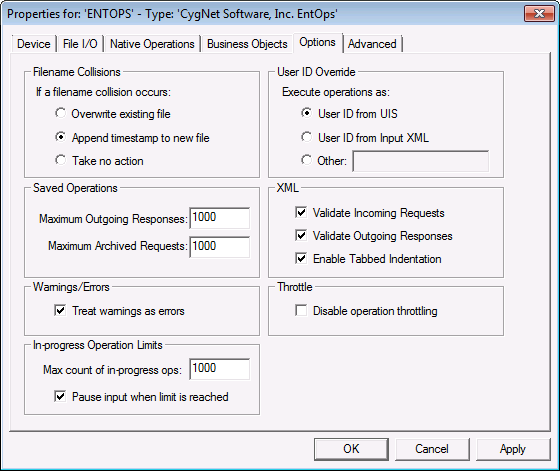
Configuration options for these items are as follows.
Filename Collisions
| Item | Description |
|---|---|
|
Overwrite existing file |
Overwrites the existing file with the new file, if a file with the same name already exists in the directory. |
|
Append timestamp to new file |
Appends a timestamp to the name of the new file, if a file with the same name already exists in the directory. This timestamp is based on the machine hosting the DDS. |
|
Take no action |
Logs an error, if a file with the same name already exists in the directory. The new file is not moved. This applies to all available directories as follows. When an Input Request file is moved to the In-Progress directory:
When a file of the same name does not already reside in the In-Progress directory, then the file is successfully moved to the directory.
|
Saved Operations
| Item | Description |
|---|---|
|
Maximum Outgoing Responses |
The maximum number of response files that can reside in the Output Responses folder. When the maximum number is reached the files are processed first in, first out. Minimum number is 10, maximum is 100,000. |
|
Maximum Archived Requests |
The maximum number of processed (archived) request files that can reside in the Processed Requests folder. When the maximum number is reached the files are processed first in, first out. Minimum number is 10, maximum is 100,000. |
Warnings/Errors
| Item | Description |
|---|---|
|
Treat warnings as errors |
Option to treat warnings as errors. If a warning occurs, the operation will be marked as failed. Click the check box to select this option. |
User ID Override
| Item | Description |
|---|---|
|
User ID from UIS |
Runs the operations specified in the request XML file as the user ID associated with the UIS running the Enterprise Operations device. |
|
User ID from Input XML |
Runs the operations specified in the request XML file as the User ID declared in the request XML file. |
|
Other |
Runs the operations specified in the request XML file as the User ID specified in the text box. The User ID must be in the format domain\user ID. |
XML
| Item | Description |
|---|---|
|
Validate Incoming Requests |
When set to "True" this option validates the request XML against the schema, and logs validation errors. Enabling this option is recommended, and ensures that the request XML is of valid Enterprise Objects syntax; that it adheres to the CygNet XSD (XML Schema Definition). Click the check box to select this option. |
|
Validate Outgoing Responses |
When set to "True" this option validates the response XML against the schema, and logs validation errors. Enabling this option is recommended, and ensures that the output XML is of valid Enterprise Objects syntax; that it adheres to the CygNet XSD (XML Schema Definition). Click the check box to select this option. |
|
Enable Tabbed Indentation |
Enables/Disables indentation of response XML. Enabling this option formats the response XML with spaces and line breaks for readability. Click the check box to select this option. Note: Enabling this option results in a larger file. |
Throttle
| Item | Description |
|---|---|
|
Disable operation throttling |
Click to disable operation throttling. This setting will remove the 5-second system-enforced delay in transaction and response allowing higher rates of operation submission. |
In-progress Operations Limits
| Item | Description |
|---|---|
|
Max count of in-progress ops |
Specifies the maximum number of operations that the Enterprise Operations EIE will add to the internal work queue. The default value is 1000. |
|
Pause input when limit is reached |
By default this option is not set, and when the maximum count limit is reached, subsequent operations will be immediately failed. If the maximum count is reached and this property is set, inbox processing will pause until the count goes below the limit. |


